2014年2月28日 星期五

2014/02/28--南投廬山沙庫斯露營Day1


Day1--東山休息站

DSC_0078

DSC_0082

DSC_0083 DSC_0089


DSC_0093


DSC_0096

埔里酒廠(2009/05/04 vs 2014/02/28)

P5020026 DSC_0102

埔里名店-->蘇媽媽湯圓

DSC_0111 DSC_0112


DSC_0117 DSC_0118

 扺達廬山沙庫斯營區

DSC_0121 DSC_0122


DSC_0123 DSC_0125

 超高難度技術=柴火煮飯,當然掌廚的就是瑞豐兄囉

DSC_0128

DSC_0131 DSC_0132


DSC_0137

DSC_0139


DSC_0140 DSC_0141

 DSC_0147

沙庫斯營區重頭戲,【湯屋】

DSC_0134 DSC_0149

DSC_0152 DSC_0153

  DSC_0155

DSC_0160

DSC_0163 DSC_0175

DSC_0180

2014年1月20日 星期一

【ISE】Interface MAB OPEN Setting


[Interface MAB OPEN Setting VLan27]

authentication event server dead action reinitialize vlan 27
authentication event server alive action reinitialize
authentication host-mode multi-auth
authentication open
authentication priority mab
authentication port-control auto
authentication periodic
mab
snmp trap mac-notification change added
snmp trap mac-notification change removed


[Interface MAB OPEN Setting VLan17]

authentication event server dead action reinitialize vlan 17
authentication event server alive action reinitialize
authentication host-mode multi-auth
authentication open
authentication priority mab
authentication port-control auto
authentication periodic
mab
snmp trap mac-notification change added
snmp trap mac-notification change removed


[Interface MAB OPEN Setting VLan26]

authentication event server dead action reinitialize vlan 26
authentication event server alive action reinitialize
authentication host-mode multi-auth
authentication open
authentication priority mab
authentication port-control auto
authentication periodic
mab
snmp trap mac-notification change added
snmp trap mac-notification change removed


[Interface MAB OPEN Setting VLan16]

authentication event server dead action reinitialize vlan 16
authentication event server alive action reinitialize
authentication host-mode multi-auth
authentication open
authentication priority mab
authentication port-control auto
authentication periodic
mab
snmp trap mac-notification change added
snmp trap mac-notification change removed


【ISE】ISE Server MAB Authentication Setting

[ISE Server MAB Authentication Setting]

aaa new-model
aaa authentication dot1x default group radius
aaa authorization network default group radius
aaa accounting dot1x default start-stop group radius
!
authentication mac-move permit
!
dot1x system-auth-control
!
logging host 10.91.1.11
logging host 10.91.1.11 transport udp port 20514
!
snmp-server enable traps mac-notification change move threshold
snmp-server host 10.91.1.11 version 2c tcbank  mac-notification
!
radius-server dead-criteria time 5 tries 3
radius-server deadtime 1
radius-server vsa send accounting
radius-server vsa send authentication
!
radius server tcbank_kao_ise
address ipv4 10.91.1.10 auth-port 1812 acct-port 1813
key tcbank
!
radius server tcbank_tpe_ise
address ipv4 10.90.90.10 auth-port 1812 acct-port 1813
key tcbank
!
radius server tcbank_kao_ise_admin
address ipv4 10.91.1.11 auth-port 1812 acct-port 1813
key tcbank
!
mac address-table notification change
mac address-table notification mac-move

2013年12月27日 星期五

Cisco 2960(LanBase) IOS 122-44.SE6 upgrade 150-2.SE5(support mab)


# Define ftp server username & password

config term
ip ftp username anonymous
ip ftp password tcbank
exit

# Use ftp service transfer IOS to flash
copy ftp://172.17.1.27/c2960-lanbasek9-mz.150-2.SE5.bin flash:

# Verify IOS file
verify /md5 flash:/c2960-lanbasek9-mz.150-2.SE5.bin 00eaf26bfc7ffe0911fa71fb9525a2bf

# Setup Boot from IOS c2960-lanbasek9-mz.150-2.SE5.bin
config term
boot system flash:/c2960-lanbasek9-mz.150-2.SE5.bin
exit
write


# After Reboot SuccessFul
# Del origin IOS folder
del /force /recursive flash:c2960-lanbasek9-mz.122-44.SE6

# Verify IOS file MD5
c2960-lanbasek9-mz.150-2.SE5.bin ==> 00eaf26bfc7ffe0911fa71fb9525a2bf
c2960-lanlitek9-mz.150-2.SE5.bin   ==> 4aa5b80dc6655fa78910e3ccd9b7502b

2013年11月25日 星期一

Cisco ASA5550 firewall Failover State & change

Login Cisco asa5550
command line Interface
#show failover state                         ###查看Failover狀態###

Result of the command: "show fail state"

                      State          Last Failure Reason      Date/Time
This host  -     Primary
                      Active         Ifc Failure                    09:10:04 CST Nov 16 2013
                              INT: Failed
Other host -   Secondary
                      Standby Ready  Ifc Failure              14:45:18 CST May 1 2013
                              EXT: Failed

====Configuration State===
Sync Done
====Communication State===
Mac set

###要將Active做切換時,先Login至Standby firewall
執行failover active,即可將Standby切換至Active
#failover active

2013年10月26日 星期六

2013/10/26美濃美綠農場露營

成員:

宛蓁家2大2小

又語家2大2小

丫凱家2大2小

傳佑家2大2小

佩玲友人


此次裝備:Logos 270 + Logos 320L

L1000190

L1000191

L1000194

L1000196

L1000198

L1000200

L1000204

L1000205

我家小綠--滿

L1000209

又語家的車

L1000210

丫凱家的車

L1000211

美綠農場大草皮

L1000212


至美濃秀宜板條用餐,芷欣耍寶中

L1000216

L1000217

L1000218

L1000219

2013年9月4日 星期三

如何透過 netsh 指令快速切換 Windows 網路設定

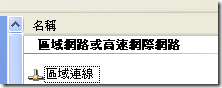
1. 先查到你的網路卡介面名稱,如下圖示,你的名稱就是【區域連線】四個字。
    網際網路連線設定
2. 再利用記事本(Notepad)開啟一份新文件,並且命名為 SwitchToDHCP.bat
3. 輸入以下指令碼(由於 Windows XP 與 Windows Vista 的指令有些差異,因此分開列表)
  • Windows 2000 / XP / 2003
    netsh interface ip set address "區域連線" source=dhcp
    netsh interface ip set dns     "區域連線" source=dhcp
  • Windows Vista / 2008
    netsh interface ip set address   "區域連線" source=dhcp
    netsh interface ip set dnsserver "區域連線" source=dhcp
    
再來,介紹如何設定網路介面到靜態 IP 模式
1. 先查到你的網路卡介面名稱,如上圖示。
2. 再利用記事本(Notepad)開啟一份新文件,並且命名為 SwitchTo公司內部IP.bat
3. 輸入以下指令碼(由於 Windows XP 與 Windows Vista 的指令有些差異,因此分開列表)
  • Windows 2000 / XP / 2003
    netsh interface ip set address "區域連線" static 10.10.1.168 255.255.255.0 10.10.1.254 1
    netsh interface ip set dns     "區域連線" static 10.10.1.1 primary
  • Windows Vista / 2008
    netsh interface ip set address   "區域連線" static 10.10.1.168 255.255.255.0 10.10.1.254 1
    netsh interface ip set dnsserver "區域連線" static 10.10.1.254 primary
設定靜態 IP 時,標準的指令公式如下:
  • Windows 2000 / XP / 2003
    netsh interface ip set address "<介面名稱>" static [IP] [子網路遮罩] [預設閘道] [閘道公制]
    netsh interface ip set dns     "<介面名稱>" static [名稱伺服器位址] primary
  • Windows Vista / 2008
    netsh interface ip set address "<介面名稱>" static [IP] [子網路遮罩] [預設閘道] [閘道公制]
    netsh interface ip set dnsserver "<介面名稱>" static [名稱伺服器位址] primary
當然,這只是針對網路介面卡做基本的設定,如果要將你現有的網路設定「完整紀錄」下來的話,可以利用以下指令達成:
netsh -c interface dump > netsh_office.cfg
上面那個指令是將你現在的網路設定全部匯出(dump)到 netsh_office.cfg 檔案中。若下次要將設定還原,可以直接利用以下指令達成:
netsh -f netsh_office.cfg
當然,載入 netsh 設定檔的指令一樣可以寫成批次檔。
未來只要把常用的幾個網路設定設定好放在你的隨身蝶裡,不管到哪裡只要對批次檔點兩下就可以設定好網路了,是不是很方便的一個小技巧呢!^_^